Many traders start exploring automation with one simple question: can a TradingView signal be turned into a real trade without manually clicking inside a trading terminal?
The answer is yes. But between a clean alert on a chart and an actual order placed with a broker, there is an important execution layer that traders often notice only after something goes wrong.
TradingView Alerts Are Not Trades
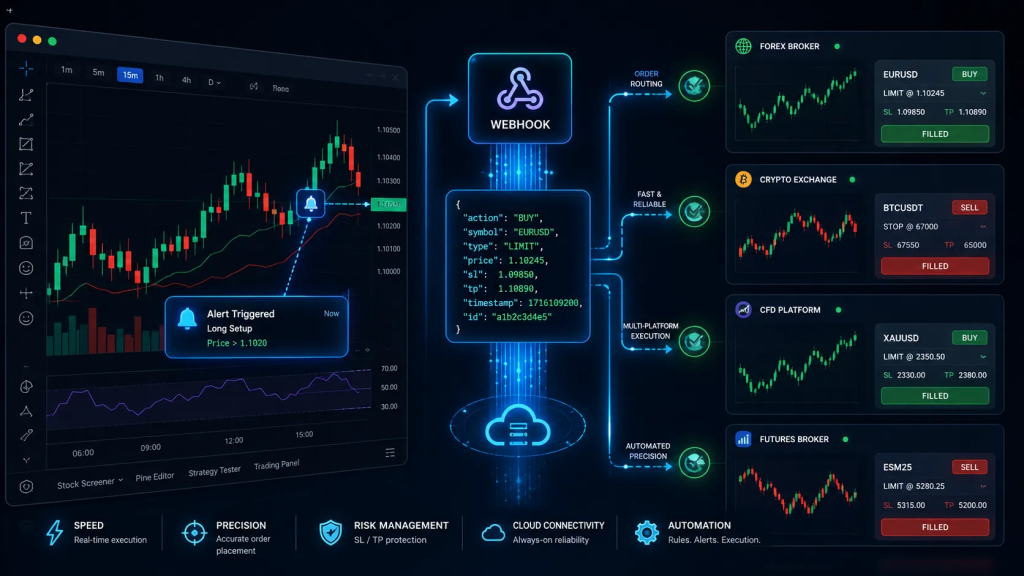
TradingView can send a webhook message when an alert is triggered. That alert may come from a Pine Script strategy, an indicator, or a simple condition on the chart. When the condition is met, TradingView sends a POST request to an external URL. The message can contain plain text, JSON, variables, or a full order structure.
From that point onward, the real work begins.
The alert itself is not a trade. It may say “buy EURUSD”, “sell BTCUSDT”, “close long”, “move stop loss”, or “place a limit order at this price”. But a broker or exchange will not automatically understand every alert format. MetaTrader 5, cTrader, TradeLocker, DXtrade, Binance, MEXC, and other trading platforms all have their own rules, symbols, order types, volume formats, and position modes.
This is why webhook trading is not just message delivery. It is order interpretation and execution.
Why Webhook Trading Breaks After the Alert
A trader may see BTCUSDT on a chart, but the destination platform may use a slightly different symbol format. One account may expect volume in lots, another in units, and another in contracts. Some platforms support hedge mode, where long and short positions can exist separately. Others use netting, where a new order adjusts the existing position. A market order can be sent immediately, but a limit or stop order needs a valid entry price. Stop loss and take profit values may be sent as absolute prices, distances, or attached orders depending on the platform.
This is where many simple automation setups start to break.
A trader may believe that the strategy is automated, while in reality the alert is only sending a text message to a third-party service. If that service does not validate the parameters, understand the order structure, or adapt the signal to the destination platform, the error is no longer inside TradingView. It appears at the execution stage.
The Execution Layer Behind Every TradingView Webhook
A proper webhook execution system needs to handle several things before sending an order. It must receive the alert, identify the correct account, validate the action, read the symbol, process the volume, detect the order type, and send the command to the right trading platform. If the alert says “flat” or “close”, the system should not open a new position. If the alert contains a limit order, the price must be treated as the entry price. If sl_price and tp_price are provided, they should be handled as exact stop loss and take profit levels, not as random values without context.
This becomes even more important when traders use several strategies at the same time.
Why Multi-Strategy Traders Need Order Routing
One trader may run a scalping strategy on MetaTrader 5, a crypto futures strategy on Binance, and a testing setup on cTrader. A trading team may use TradingView as the signal source while routing orders to different platforms depending on the instrument, broker, or client account. In these situations, the basic idea of “alert equals buy or sell” is no longer enough.
Routing becomes essential.
Order routing means that each webhook knows where it should go. One signal may be sent to MT5, another to TradeLocker, another to MEXC Futures. The important part is that the details of the signal are not lost along the way. If the strategy sends order_type, price, stop loss, take profit, or a specific trading mode, those values should remain part of the execution flow until the order reaches the destination platform.
Otherwise, automation becomes manual trading with extra technical risk.
Trading Modes: Hedge, Netting, Opposite, and Inverse
Trading modes are another part of the problem. Some traders need hedge mode, where long and short positions are managed separately. Others prefer netting, where the position is recalculated as new orders arrive. Some use opposite mode to close the current side and open the other side. Others may intentionally use inverse mode, where buy becomes sell and sell becomes buy, because their strategy is designed around reverse execution.
These modes should not be guessed after the alert arrives. They should be part of the webhook setup or included directly in the webhook message.
Market, Limit, and Stop Orders Need Different Logic
Pending orders create another challenge. A market order is executed immediately, but limit and stop orders require a specific price. If a trader sends order_type=”limit” with a price, the execution system must understand that this is not a regular market entry. If a close or flat command comes later, any related pending order should not be left forgotten on the broker side. It needs to be handled according to the logic of that specific platform.
What Traders Should Check Before Choosing a TradingView Webhook Tool
This is why traders should look beyond a simple promise like “automate your alerts” when choosing a TradingView webhook trading solution. The real question is what happens after the alert is triggered.
Can the system work with more than one platform? Does it support MT5 only, or can it also route signals to other trading environments? Can it handle structured JSON? Does it support market, limit, and stop orders? Can it pass absolute stop loss and take profit levels? Does it understand hedge, netting, opposite, and inverse execution modes? Can one webhook be tied to the correct account without mixing strategies together?
How AlgoWay Turns TradingView Alerts Into Real Orders
AlgoWay is built around this exact execution problem: receiving a TradingView webhook and turning it into a real order across different trading platforms. Instead of forcing traders into one terminal or one execution model, AlgoWay gives them a structured way to send alerts and route them to the platform where the trade should actually happen.
This matters because automation does not make a strategy profitable by itself. A poor strategy will still be poor even with fast execution. But if a strategy already has clear rules, bad execution can damage the result. A wrong symbol, wrong volume, forgotten pending order, missing stop loss, or signal sent to the wrong account is not a market problem. It is an infrastructure problem.
TradingView Webhook Trading Is Execution Discipline
TradingView webhook trading is not magic. It is execution discipline.
When an alert is triggered, the trader should not have to wonder whether the signal arrived, whether the symbol was understood, whether the order type was processed correctly, or whether the trade was routed to the right destination. Those rules should be defined in advance, and the system should execute them consistently.
When a Narrow Connector Is No Longer Enough
For traders comparing automation tools, it is worth looking beyond one brand name or one connector. If the goal is only to connect TradingView to a single MetaTrader account, a narrow tool may be enough. But when trading expands into multiple brokers, crypto exchanges, prop platforms, different position modes, and different order types, it becomes more important to use a system that can handle that complexity from the start.
A practical example of this multi-platform approach can be found on AlgoWay’s TradersPost alternative page, where the execution flow is explained through real webhook scenarios and platform routing examples.